No sensor required
Solve before you dismiss.
A short calculation adds enough friction to interrupt automatic snoozing while staying private and simple.
- Best for
- Heavy sleepers and snoozers
- Access
- None beyond alarm delivery
- Pressure
- Medium to high
The iPhone alarm app for heavy sleepers, chronic snoozers, shift workers, and anyone who needs the alarm state to be clear before the night starts.
Why Ringly
Mission alarm apps prove people need stronger mornings. Ringly keeps the useful pressure, then makes the experience calmer: fewer up-front choices, honest degraded states, and setup language that does not overclaim.
Sound preview
This is an optional audio preview for the website. It only plays when the visitor chooses to start it.
Wake Profiles
Choose a profile, confirm the wake time, and let Ringly suggest the right alarm pressure without turning setup into a long questionnaire.
Recommended setup
Ringly starts with stronger sound, a wake challenge, and clear access checks before the alarm is treated as ready.
Mission stop flows
Missions make dismissal less automatic. Pick the kind of friction that fits the morning, then Ringly explains the required access before you rely on it.
No sensor required
A short calculation adds enough friction to interrupt automatic snoozing while staying private and simple.
Trust layer
The app is designed around visible readiness states, permission restraint, and recovery copy that says what happened instead of hiding uncertainty.
Alarms can be ready, waiting for access, degraded, or saved with a warning. The user sees the difference.
Camera and Motion are not treated like alarm-wide requirements. They only matter when the chosen mission uses them.
The current product contract avoids ad-tech positioning and keeps wake intelligence behind a deliberate privacy review.
Mission & goal
Alarm state should be visible, specific, and understandable. If access is missing or a mission cannot run, the app should say so clearly.
Ringly is not trying to make mornings stressful. The goal is to stop automatic dismissal with the least pressure that still works for the chosen profile.
Camera, motion, photos, and scan access should be tied to selected missions, not collected as a default posture.
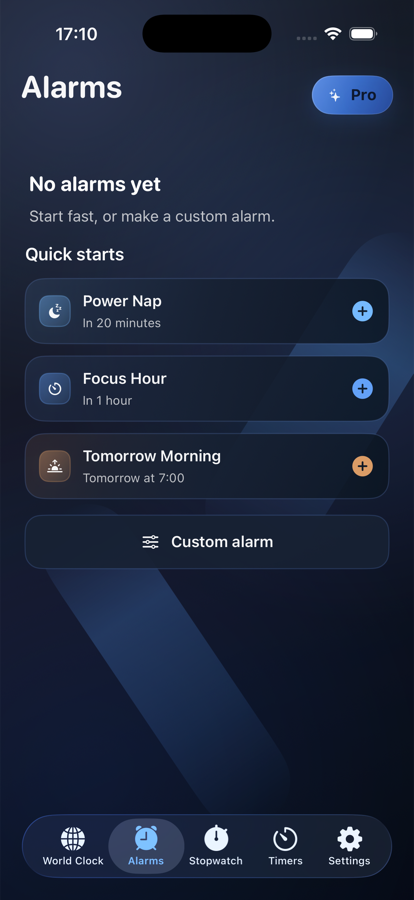
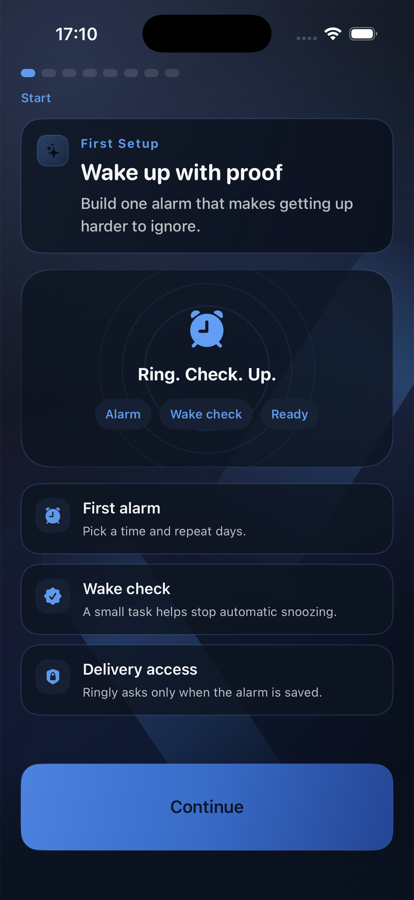
Current app screens
These captures were refreshed from the current simulator build, replacing the old UI-test screenshots that made the page look dated.
Compared with louder alarm apps
FAQ
No. This website is a Cloudflare Pages-ready prototype that reflects the current iPhone app direction.
Yes. Set the Pages project root to Website, leave the build command empty, and use / as the output directory.
Add the real App Store URL, final custom domain, final screenshots, and any legal pages required for launch.
The App Store link can be added here as soon as the production listing is live.
Ask for launch access